# Leaflet.PolylineMeasure
* Leaflet Plugin to **measure distances** of simple lines as well as of complex polylines.
* Measuring in **metric system** (metre, kilometre), in **imperial system** (foot, landmile), or in **nautical miles**.
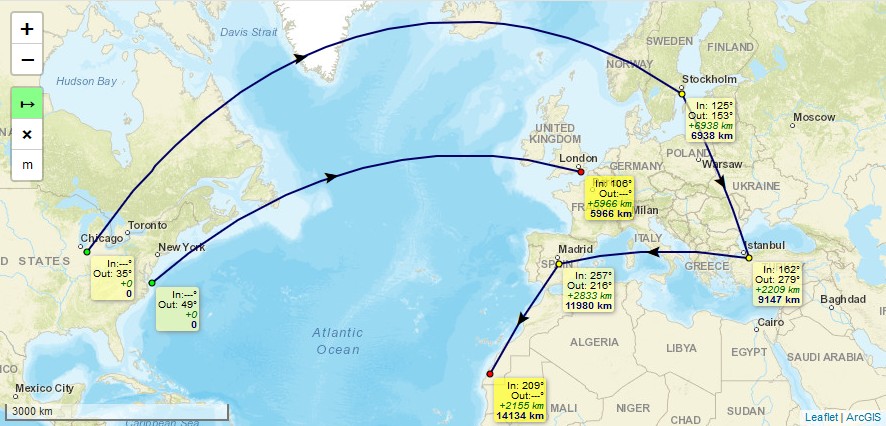
* Lines are drawn as realistic arcs. **Bearings** and **distances** are calculated considering [**Great-circle distance**](https://en.wikipedia.org/wiki/Great-circle_distance) which is the shortest path between 2 points on Earth.
* **Arrows** indicating the **real midways** of the line's great-circle **distances**, not their optical middle which is different due to projection, especially in high latitudes.
* To **finish** drawing a line just *doubleclick*, or *singleclick* onto the last (=orange) point, or *press "ESC"-key*.
* **Moving** of line's points afterwards is possible by clicking and draging them. *(This feature can not be guaranteed to work on every **mobile** browser using touch input, e.g. with Chrome Mobile it isn't working right now)*
* To **continue** a line after it has been finished, hold the *Ctrl-Key* while clicking onto the first or last point of a line.
* To **add** points, hold the *Ctrl-Key* while clicking onto an arrow.
* To **delete** points, hold the *Shift-Key* while clicking onto a point.
* It is an evolution of jtreml's Plugin [leaflet.measure](https://github.com/jtreml/leaflet.measure) since the original plugin hasn't been bugfixed for years. I modified it to work again with **Leaflet v1.0 and newer** (still runs with Leaflet v0.7) and added functional and optical improvements.
## Demos
* Please take a look at [**Demo 1**](https://ppete2.github.io/Leaflet.PolylineMeasure/demo1.html) (metre units, bearings, with Clear-button and Units-button) or [**Demo 2**](https://ppete2.github.io/Leaflet.PolylineMeasure/demo2.html) (landmile units, without bearings, without Unit-button) or [**Demo 3**](https://ppete2.github.io/Leaflet.PolylineMeasure/demo3.html) (nauticalmile units, bearings, without Unit-button and Clear-button) [**Demo 4**](https://ppete2.github.io/Leaflet.PolylineMeasure/demo4.html) (two maps)
## Usage
Add 2 code lines within your **HTML-file** to load the .css and .js files of the plugin:
```html
```
Add 1 code line within your **Javascript-file** to add the plugin's control into your Leaflet map.
```js
L.control.polylineMeasure(options).addTo(map);
```
## Package manager install
It's possible to install and update this plugin using package managers like "npn". These optional feature got added by other users. I'm not familiar with nor responsible to keep these optional package manager installs up-to-date. If you notice that such installs are outdated, feel free to provide a Pull request or contact one of the persons who once introduced those install variants, thanks.
## Default options
```js
options = {
position: 'topleft', // Position to show the control. Values: 'topright', 'topleft', 'bottomright', 'bottomleft'
unit: 'metres', // Show imperial or metric distances. Values: 'metres', 'landmiles', 'nauticalmiles'
clearMeasurementsOnStop: true, // Clear all the measurements when the control is unselected
showBearings: false, // Whether bearings are displayed within the tooltips
bearingTextIn: 'In' // language dependend label for inbound bearings
bearingTextOut: 'Out', // language dependend label for outbound bearings
tooltipTextDraganddelete: 'Click and drag to move point Press SHIFT-key and click to delete point',
tooltipTextResume: ' Press CTRL-key and click to resume line',
tooltipTextAdd: 'Press CTRL-key and click to add point',
// language dependend labels for point's tooltips
measureControlTitleOn: 'Turn on PolylineMeasure', // Title for the control going to be switched on
measureControlTitleOff: 'Turn off PolylineMeasure', // Title for the control going to be switched off
measureControlLabel: '↦', // Label of the Measure control (maybe a unicode symbol)
measureControlClasses: [], // Classes to apply to the Measure control
showClearControl: false, // Show a control to clear all the measurements
clearControlTitle: 'Clear Measurements', // Title text to show on the clear measurements control button
clearControlLabel: '×', // Label of the Clear control (maybe a unicode symbol)
clearControlClasses: [], // Classes to apply to clear control button
showUnitControl: false, // Show a control to change the units of measurements
unitControlTitle: { // Title texts to show on the Unit Control button
text: 'Change Units',
metres: 'metres',
landmiles: 'land miles',
nauticalmiles: 'nautical miles'
},
unitControlLabel: { // Label symbols to show in the Unit Control button
metres: 'm',
kilometres: 'km',
feet: 'ft',
landmiles: 'mi',
nauticalmiles: 'nm'
},
tempLine: { // Styling settings for the temporary dashed line
color: '#00f', // Dashed line color
weight: 2 // Dashed line weight
},
fixedLine: { // Styling for the solid line
color: '#006', // Solid line color
weight: 2 // Solid line weight
},
startCircle: { // Style settings for circle marker indicating the starting point of the polyline
color: '#000', // Color of the border of the circle
weight: 1, // Weight of the circle
fillColor: '#0f0', // Fill color of the circle
fillOpacity: 1, // Fill opacity of the circle
radius: 3 // Radius of the circle
},
intermedCircle: { // Style settings for all circle markers between startCircle and endCircle
color: '#000', // Color of the border of the circle
weight: 1, // Weight of the circle
fillColor: '#ff0', // Fill color of the circle
fillOpacity: 1, // Fill opacity of the circle
radius: 3 // Radius of the circle
},
currentCircle: { // Style settings for circle marker indicating the latest point of the polyline during drawing a line
color: '#000', // Color of the border of the circle
weight: 1, // Weight of the circle
fillColor: '#f0f', // Fill color of the circle
fillOpacity: 1, // Fill opacity of the circle
radius: 3 // Radius of the circle
},
endCircle: { // Style settings for circle marker indicating the last point of the polyline
color: '#000', // Color of the border of the circle
weight: 1, // Weight of the circle
fillColor: '#f00', // Fill color of the circle
fillOpacity: 1, // Fill opacity of the circle
radius: 3 // Radius of the circle
},
};
```